


Huckleberry: Baby Tracker
4.93.63K Reviews
App Specs
- Version
- 0.9.299
- Updated On
- License
- Free
- Downloads
- 1,000,000+
- Developer
- Huckleberry Labs
- Categories
- Parenting
- Platform
- Android, iOS
Screenshots
 Analysis by AppCompare
When caring for a baby, the hard part is often not one big decision but keeping track of dozens of small ones while tired. I see Huckleberry: Smart Baby Care as a practical place to collect those details: sleep, feeds, diapers, growth, and the questions that come up along the way. It is a parenting app from Huckleberry Labs, and its strongest appeal is the chance to turn scattered notes into a routine you can review and share.
What the free starting point tells you
The app is free to install, which makes it easy to try before deciding whether it belongs in your daily routine. It also offers in-app purchases, with listed items ranging from $11.99 to $119.99. Those figures describe the available purchase range, not a promise that every feature requires payment or that one particular purchase is right for every family. I would begin with the free access and see whether the tracking itself solves a real problem before spending anything.
That distinction matters in parenting apps: logging basics can be useful on its own, while paid help is only worthwhile if it fits a family’s needs and budget. I would check the purchase details in the app before committing, especially if I were comparing a one-time need with ongoing support. The app is rated for Everyone, but parents should still use their judgement about what information they enter and how they want to manage it.
How it fits into everyday baby care
I find the most useful way to approach everyday baby care is to decide which details will actually help the next caregiver or answer a question later, rather than trying to log every moment. A short, shared routine for recording sleep or feeds can make Huckleberry’s history more dependable without adding unnecessary work. That practical starting point also makes it easier to judge whether the app’s broader tracking and guidance are worth keeping in your routine.
Getting Started with Huckleberry
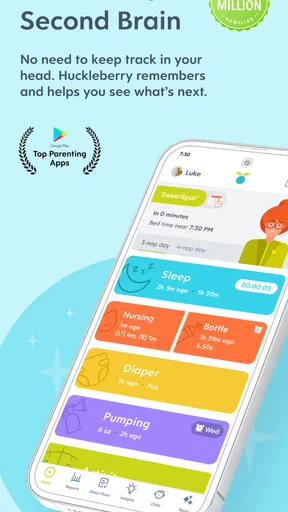
The first thing you notice when you open Huckleberry: Smart Baby Care is its clean, user-friendly interface. Setting it up is a breeze. Just plug in some basic info about your little one, and you're good to go. The app is packed with features, but don’t worry—it’s all laid out in a way that’s easy to navigate.
Sleep Tracking and Analysis
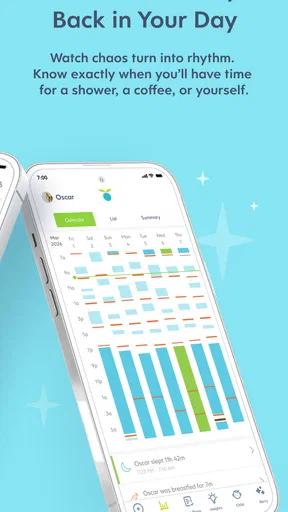
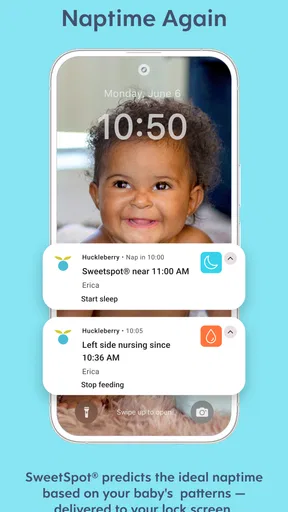
One of the standout features of Huckleberry is its sleep tracking capability. As any parent knows, sleep (or lack thereof) is a big deal. The app lets you log your baby’s sleep patterns, offering insights that are both detailed and easy to understand. It even provides personalized sleep predictions, so you can plan your day (and hopefully catch some Zs yourself!).
For me, the best use of sleep predictions is as a planning aid, not a strict schedule. If an unexpectedly short nap shifts the day, I would treat the suggested timing as a prompt to watch for tired signs rather than as a rule to follow. A log becomes more useful when it captures what actually happened, including imperfect naps, instead of making the day look tidier than it was. That gives you a better basis for spotting patterns over time.
Worth Reading Before You Choose

EA SPORTS FC Mobile 26 Is a Bigger Football Game, but It Takes Time

Flipboard Shows What News Apps Must Do Beyond the Feed

Switching to Android Auto Means Rethinking Your Driving Routine

Google Calendar Makes a Crowded Week Easier to Manage

Ludo King Makes the Most of the Minutes Between Plans

Baby Panda World Brings Quick Play to Modern Phones, but Its Game Library Feels Busy
Feeding and Diaper Logs
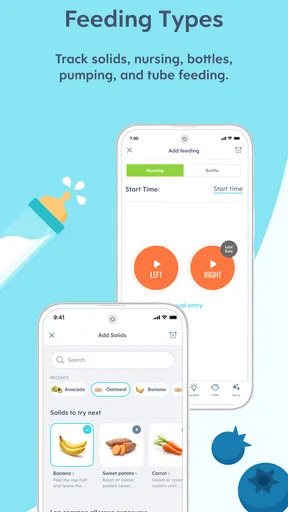
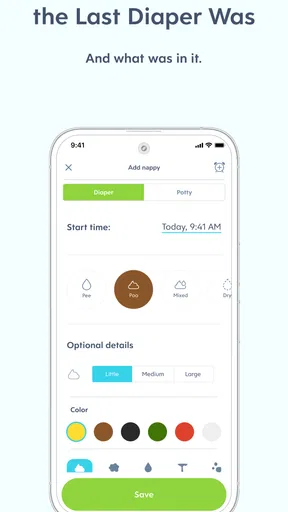
Remembering when your baby last ate or had a diaper change can be surprisingly tricky, especially during those sleep-deprived days. Huckleberry’s feeding and diaper logs are super handy for this. With a few taps, you can record meals, nursing sessions, and changes, helping you keep track of your baby’s routine effortlessly.
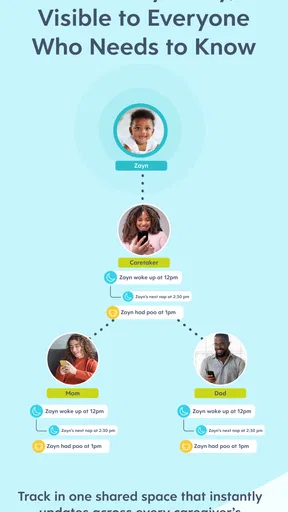
A realistic benefit is the handoff between caregivers. If one person has been handling the morning and another takes over later, a shared record can answer practical questions without relying on a tired memory: when the last feed happened, or whether a change was already logged. I would agree on a simple logging habit with anyone who helps care for the baby. A record is only dependable when the people using it enter information consistently, and duplicate or missed entries can make the history confusing.
Growth and Development Tracking
Keeping an eye on your baby’s growth is crucial, and Huckleberry makes it simple. You can log weight, height, and head circumference, tracking how your little one stacks up against developmental milestones. It’s a reassuring way to ensure your baby is on the right track.
I would use these entries as an organized history to bring into conversations with a pediatrician, not as a diagnosis or a substitute for clinical guidance. If a number worries you, the useful next step is to discuss it with a qualified professional rather than trying to interpret an app record alone. Keeping measurements together can make it easier to recall what was recorded at earlier visits, but it cannot explain every change or account for the context a clinician would consider.
Personalized Tips and Insights
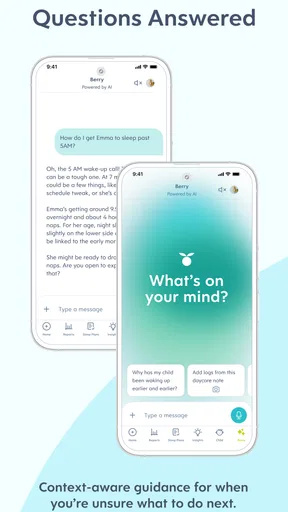
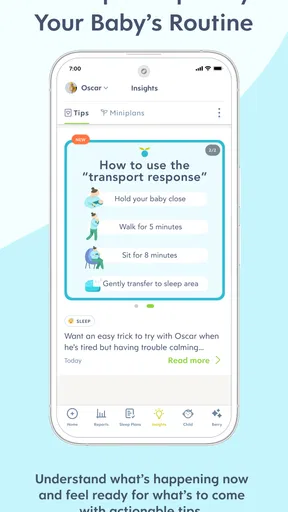
What sets Huckleberry apart is its personalized advice. Based on the data you input, the app offers tailored tips to help you navigate parenting challenges. Whether you’re dealing with sleep regression or teething troubles, Huckleberry has your back with practical advice that feels like it comes from a trusted friend.
What the tracking can—and cannot—do
The main trade-off is that helpful guidance depends on the quality of the information you put in. When nights are hectic, logging every nap or feed may feel like another task, and missing entries can weaken the picture the app builds. I would focus on the details that answer a current question—perhaps sleep timing for a while, or feeds during a caregiver handoff—instead of trying to record everything perfectly from day one. That lighter approach keeps the tool useful without turning care into bookkeeping.
Compared with a paper notebook or a basic notes app, Huckleberry gives baby-specific categories and brings sleep, feeding, diaper changes, growth, and advice into one place. A notebook may be faster for someone who prefers free-form notes, while a simple timer or phone reminder may be better if the only need is remembering one event. Huckleberry makes more sense when you want a running record and patterns to review, rather than just a single alert.
It is also not the right fit for every parent. If tracking makes you anxious, encourages you to second-guess normal variation, or takes attention away from being with your baby, it is reasonable to keep fewer records or skip the app. Personalized suggestions can support planning, but babies do not always follow predictable patterns. I would treat the app as a helpful reference and keep medical concerns between you and your child’s healthcare professional.
Who is likely to get the most value
I think the strongest fit is a household that has several caregivers, is trying to understand sleep routines, or wants one place to recall everyday details. For example, after a night with broken sleep, a parent taking over in the morning can check the recent record, note the next feed, and avoid asking the other caregiver to reconstruct every detail from memory. Over time, those entries may also help a family notice whether a change is recurring or was simply an unusual day.
It may be less useful if you already have a reliable shared system, prefer not to enter personal care details in an app, or only need occasional reminders. In those cases, a paper log or a very simple note can be quicker and less demanding. The choice is not about tracking more; it is about whether a clearer record reduces stress for your family.
A few practical questions to settle before relying on it
Will it work for a baby whose routine changes constantly? That is precisely when a log can help, provided you read predictions flexibly and record actual events instead of trying to force a schedule. Does it replace professional advice? No: growth records and parenting tips can help you organize questions, but they are not a clinical assessment. Is it worth paying for? I would first see whether the free access covers the tracking I want, then weigh any purchase against the specific support I expect to use rather than assuming that a paid option is necessary.
For families sharing care, I would also decide who is responsible for entering each event and how much detail is genuinely useful. A brief, consistent record is usually more actionable than a perfect record that nobody can maintain. If you are testing the app, choose one routine to track for a short stretch and review whether the history helps you make a practical decision; if it only adds pressure, simplify or stop.
In a world overflowing with parenting apps, Huckleberry: Smart Baby Care truly stands out. It’s a comprehensive tool that offers valuable support throughout the early stages of parenting. While no app can replace the advice of a pediatrician, Huckleberry is a fantastic companion for any parent looking to make sense of those early, often chaotic days. So, if you’re in the thick of it with a baby at home, give Huckleberry a go—it might just become your new best friend.
My buy-or-skip take
Huckleberry has an average rating of 4.8 from around 31,000 ratings, and it has been installed over a million times, which suggests many families have found it worth trying. It first appeared in 2017, and version 0.9.281 is listed for devices running iOS 10 or later. I would not use popularity as proof that it will suit every household, but it does make the app an established option rather than an obscure experiment.
My recommendation is to try the free version if you want a more organized view of your baby’s daily care and are comfortable keeping a digital log. I would skip it, or use only a few of its tracking tools, if logging feels burdensome or if you prefer a private, informal notebook. The best value comes from using the records to make handoffs clearer and questions easier to discuss—not from chasing a perfectly documented day.
Pros
- Easy-to-use interface for busy parents.
- Personalized sleep plans for babies.
- Tracks feeding
- sleep
- and growth.
- Insights from pediatric sleep experts.
- Syncs data across multiple devices.
Cons
- Premium features require subscription.
- Limited offline functionality.
- Occasional syncing issues reported.
- Notifications can be overwhelming.
- Lacks detailed analytics for some users.
FAQs for Huckleberry: Baby Tracker
What features does Huckleberry: Smart Baby Care offer?
Huckleberry: Smart Baby Care provides a comprehensive suite of tools designed to assist parents in managing their baby's needs. It includes sleep tracking, feeding logs, and diaper change records. Additionally, the app offers personalized sleep advice from pediatric sleep experts, helping parents create optimal sleep schedules for their infants.
Is Huckleberry: Smart Baby Care suitable for newborns?
Yes, Huckleberry is designed to cater to babies of all ages, including newborns. The app’s features are tailored to track and support the growth and development of newborns, offering guidance on sleep patterns, feeding schedules, and more. Its adaptability makes it a versatile tool for parents from day one.
How does the sleep advice feature work in Huckleberry?
The sleep advice feature in Huckleberry uses data entered by parents about their baby's sleep patterns and routines. This information is analyzed by pediatric sleep experts who provide personalized recommendations. These tailored insights help parents establish effective sleep strategies unique to their child's needs.
Is Huckleberry user-friendly for first-time parents?
Absolutely. Huckleberry is designed with an intuitive interface that is easy to navigate, even for first-time parents. The app guides users through each feature with clear instructions and tips, ensuring that parents can efficiently utilize all the tools available to support their child's care.
Does Huckleberry offer any free features or is it subscription-based?
Huckleberry offers both free and premium features. The basic version, which includes essential tracking tools, is free. For more advanced features like personalized sleep plans and detailed expert advice, a subscription is required. This tiered approach allows parents to choose the level of support they need.


